
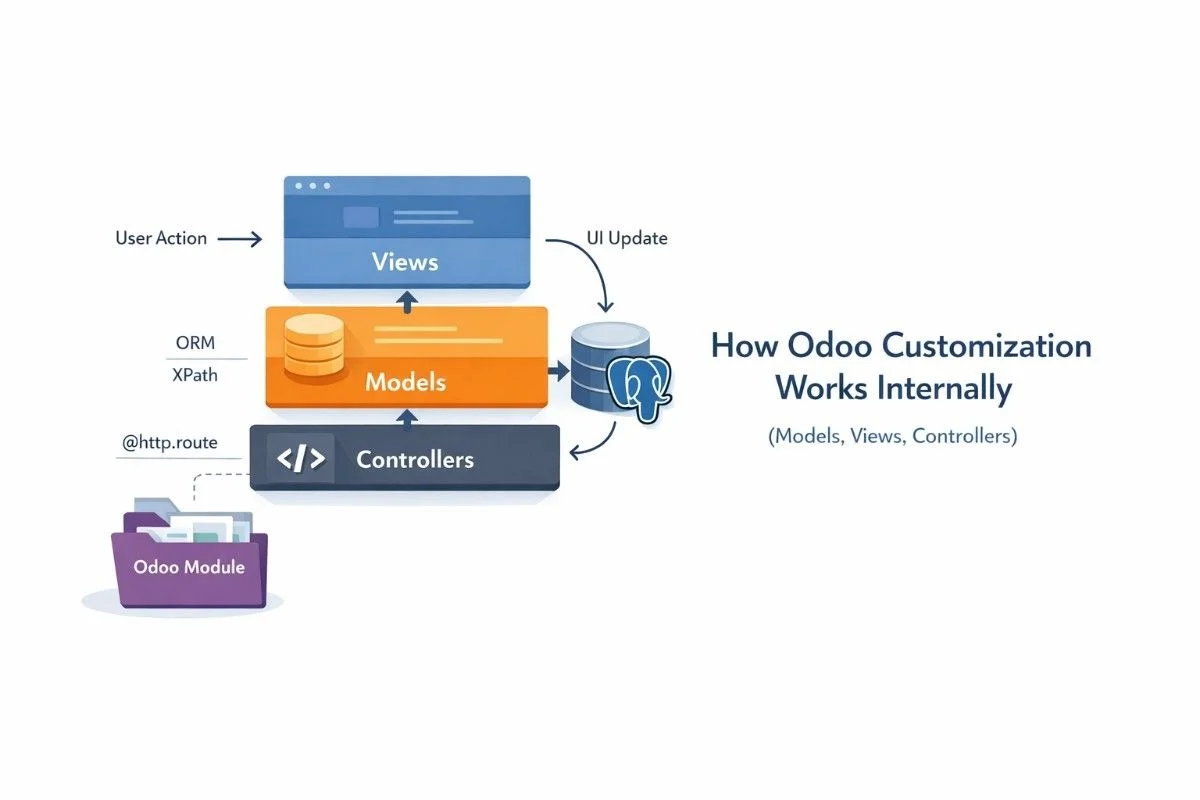
Odoo customization works through a clear MVC-like split. Models hold data and business rules in Python using Odoo’s ORM, so your fields map to PostgreSQL and methods like create() and write() enforce logic. Views control what users see, stored as XML records (often in ir.ui.view) and changed safely with XPath inheritance. Controllers handle web routes with @http.route for website pages and JSON APIs.
Odoo also works like a loop in real life: the user opens a screen or clicks a button, the web client loads the view, the server runs model methods through the ORM, PostgreSQL stores or updates data, computed fields update when dependencies change, and the UI refreshes with the final merged view. Odoo feels “model-heavy” because most business logic belongs in models, while controllers mostly bridge web requests to that logic.
If you want the business meaning first, read what Odoo customization means with business examples before the technical deep dive.
Models: Where Odoo Stores Data and Runs Logic
This section explains what Odoo models are and how they control your data and business rules. You will learn how the ORM maps models to PostgreSQL tables, how to extend models safely with inheritance, and how fields, computed values, and method overrides like create() and write() shape real custom behavior.
What a model is in Odoo, in plain words
A model is the “business object” that stores data and runs rules, like sale.order for sales orders or res.partner for contacts. In Odoo, you write a model as a Python class, and Odoo works with it as a recordset so you can run methods on 1 record or many records.
If you need a broader foundation, use what Odoo ERP is and Odoo ERP modules explained to connect the technical pieces to real ERP apps.
ORM mapping (Python class → PostgreSQL table)
Odoo’s ORM lets you treat database rows like Python objects, so you create, read, update, and delete records through model methods instead of writing SQL for everything. The ORM documentation shows how models inherit from models.Model and how recordsets behave during iteration and method calls.
When you define fields on a model, Odoo persists them in PostgreSQL when you set them as stored fields. You should treat the ORM as your main contract because it protects consistency, security checks, and module upgrades better than direct SQL in most cases.
Extension patterns: _inherit vs _name, and when each is correct
_inherit without _name extends an existing model in place, so you add fields or override methods without creating a new model name. The ORM docs call this “Extension” and show the behavior clearly.
_inherit with a different _name creates a new model based on the old one (classical inheritance), so you want it when you need a separate model identity. In my 10 years working with Odoo implementations, I keep seeing teams misuse _name when they only wanted to add two fields, and that mistake later breaks reporting, security, and integrations.
For a full implementation pathway, connect this section with a technical overview of Odoo customization and how to develop custom Odoo modules.
Fields that matter in customization
Relational fields shape most real ERP work, so you should master Many2one (one link), One2many (many linked records), and Many2many (many-to-many). These fields decide how Odoo joins data, how forms show related lines, and how performance behaves at scale.
You should also understand computed fields and the “stored vs non-stored” choice because it changes whether PostgreSQL can index and search the values efficiently. Overusing non-stored computed fields can slow list views and reports when datasets grow.
Method overrides safely (create, write, unlink) and why you must be careful
Overriding create() and write() lets you enforce business rules at the safest point because everything passes through them. You must keep overrides small, call super(), and avoid extra searches inside loops because that creates “N+1” query patterns.
A safe rule: validate inputs, set defaults, then delegate to the parent method. If you need heavy logic, move it to a separate model method and call it from multiple places (form button, cron job, controller) so you avoid duplicated logic.
Decorators that change behavior (@api.depends, @api.onchange) and what they really do
@api.depends tells Odoo what inputs affect a computed field, so Odoo knows when it must recompute that value. A wrong dependent list makes values stale or recompute too often.
@api.onchange updates values on the form while the user edits, so it improves UX but does not replace server-side validation. You should still enforce real rules in constraints or in create() / write() so imports and APIs behave correctly too.
Security hooks that developers forget (access rights, record rules, sudo risks)
Security lives in two places: access control lists (can the user read/write/create/delete the model?) and record rules (which records can they see?). Views can hide buttons, but ACLs and rules decide real access.
Use sudo() like a scalpel, not a hammer. When you apply sudo() in the wrong place, you bypass record rules and you can leak data through a controller or a computed field.
If you want a dedicated safety mindset, continue with customized Odoo without breaking core functionality and Odoo development best practices.
Views: How Odoo Screens Are Made
This section explains how Odoo builds the screens users work with, like forms, lists, kanban, and search views. You will learn how views pull data from models, how XML and XPath inheritance let you change the UI without editing core code, and how to debug when a view change does not appear.
What a view is, and why XML is stored as records
A view defines how Odoo shows model records to users, like forms and lists, and Odoo stores views as XML records so modules can load, inherit, and resolve them dynamically. Odoo’s views reference shows a generic view record stored in ir.ui.view.
That database storage matters because Odoo can merge many inherited views into one final screen for each user, depending on installed modules and security groups.
Types of views that appear in real projects
Odoo uses multiple view types to match real workflows: form for detail, list/tree for tables, kanban for cards, search for filters, and pivot/graph for analysis. Odoo’s views reference describes these view types and how they structure UI layouts.
If you plan customization scope, see top Odoo modules to customize so you pick the right targets first.
View inheritance and XPath, step by step
View inheritance lets you change a core screen without editing the core XML, so upgrades stay safer. Odoo resolves views by taking a primary view, resolving parents, then applying child extensions depth-first to build the final arch.
XPath is the locator you use to find the exact node to change, and Odoo supports positions like inside, after, before, replace, and attributes. The views documentation lists these locators and positions and explains how Odoo applies them sequentially.
Tiny example (add one field after another):
<xpath expr=”//field[@name=’partner_id’]” position=”after”>
<field name=”x_internal_ref”/>
</xpath>
Common XPath mistakes and how to debug them
XPath breaks when your target node does not exist in the parent view, or when another inherited view already replaced that section. You should debug by checking the final view architecture in developer mode and confirming the inheritance chain. Odoo even documents that inheritance applies in a defined order and can raise errors for invalid positions.
A practical rule: target stable anchors like field nodes with names, not brittle div chains, unless you must.
Actions, menus, and why views do not show up without them
Views do not “appear” by magic. Actions (like ir.actions.act_window) tell Odoo which model and view modes to open, and menus point to actions. If you inherit a view but never reach it through an action, you will not see it in the UI.
For planning the full chain, keep Odoo customization guide handy, and review common mistakes during Odoo implementation when things do not show up as expected.
OWL and the modern web client, explained simply
Odoo’s web client renders the final view architecture in the browser and updates the UI after server calls. You do not need to learn every frontend detail to customize safely, but you should know this: models run truth, views present truth, and the client re-renders when the server returns changes.
Controllers: How Odoo Handles Web Pages and APIs
This section explains how Odoo controllers handle web requests and connect URLs to Python code. You will learn how routes work, how Odoo serves website pages and returns JSON for APIs, and why good controllers stay thin by calling model methods for the real business logic.
What controllers do in Odoo (and what they do not)
Controllers map URLs to Python methods, so they power website pages, checkouts, and external APIs. Odoo’s controller docs define routing with @odoo.http.route and explain how it routes incoming requests to the decorated method.
Controllers should not hold heavy business rules. You should keep controllers thin and push real logic into models so you can reuse it from UI buttons, scheduled actions, imports, and APIs.
@http.route basics (auth, type=http vs type=json, methods, csrf)
@odoo.http.route supports auth, type, methods, and CSRF handling, and the docs explain these parameters and defaults.
Odoo also exposes a request wrapper on odoo.http.request, so you can access environment and session utilities inside controller code. The docs describe this request object and how it wraps incoming HTTP requests.
Building APIs and website flows safely
You should protect public endpoints, validate input, and return only what the caller needs. When you build integrations, plan the ecosystem too, and link your integration story to top Odoo integrations for productivity when you talk about APIs and third-party tools.
Where business logic belongs (thin controllers, strong models)
Business logic belongs in models because the ORM gives you consistency, security, and reuse. The safest controller reads input, calls a model method, then returns a response.
Module Files and Load Order (So Upgrades Don’t Break)
This section explains which files an Odoo module needs, the order Odoo loads them, and why that order matters. You will learn how to add models, views, and security rules in a clean way, so your customization installs smoothly and still works after future Odoo upgrades.
Minimal module anatomy
A clean custom module includes __manifest__.py, __init__.py, Python files in models/, XML in views/, security files for ACLs, and optional controllers/. This structure keeps your changes isolated and upgrade-friendly.
If you want the module building steps end-to-end, read how to develop custom Odoo modules and complete guide to Odoo customization.
Data loading order and why it breaks installs when wrong
Your manifest loads XML and CSV files in order, so missing dependencies or loading a view before its model fields exist can break installs. You should load security first, then data, then views, and always list correct dependencies.
The “do not break core” rule: inherit, do not edit base
You should inherit models and views instead of editing core files, because upgrades replace core files. Competitor guides often say this, but they do not always show what “inherit safely” means at the view-resolution level.
Upgrade-safe checklist
- Extend with _inherit instead of editing core code.
- Prefer XPath patches over full view replacements.
- Keep controllers thin and re-decorate overridden routes.
- Add ACLs and record rules for every new model.
- Document your customization intent and test it after upgrades.
For strategic context, also review what Odoo ERP customization is and Odoo Enterprise vs Community.
Real-World Example (Simple but Complete)
A simple customization touches all three layers: you add a field in a model, you show it in a form view, and you expose it through a JSON route.
1) Model (Python)
You extend an existing model with _inherit so you do not fork core.
from odoo import models, fields
class ResPartner(models.Model):
_inherit = “res.partner”
x_internal_ref = fields.Char(string=”Internal Reference”)
2) View (XML with XPath)
You inherit the base view and insert the field with XPath.
<record id=”res_partner_form_inherit_internal_ref” model=”ir.ui.view”>
<field name=”name”>res.partner.form.inherit.internal.ref</field>
<field name=”model”>res.partner</field>
<field name=”inherit_id” ref=”base.view_partner_form”/>
<field name=”arch” type=”xml”>
<xpath expr=”//field[@name=’name’]” position=”after”>
<field name=”x_internal_ref”/>
</xpath>
</field>
</record>
3) Controller (JSON route)
You create a route, read the partner through the ORM, and return JSON.
from odoo import http
from odoo.http import request
class PartnerAPI(http.Controller):
@http.route(“/api/partner/<int:partner_id>”, type=”json”, auth=”user”, methods=[“POST”])
def partner_ref(self, partner_id):
partner = request.env[“res.partner”].browse(partner_id)
return {“id”: partner.id, “internal_ref”: partner.x_internal_ref}
Debugging Playbook
If a field is not visible
The field usually fails because the model did not load, the user lacks access, the XPath did not match, or the action uses a different view than you think. Check the final resolved view architecture and inheritance chain because Odoo applies inherited views in a specific order.
If a compute does not update
The compute usually fails because the depends list misses a trigger, or you used the wrong stored setting. Fix the dependency graph first, then retest by changing the input fields that should trigger recompute.
If a controller does not get called
The route usually fails because the path does not match, the auth blocks the caller, or you forgot to re-decorate an overridden method. Odoo’s controller docs explicitly warn that overridden controller methods must be redecorated to keep routes published.
When to Use Studio vs Custom Code
Studio fits when you only need small UI changes, simple fields, and safe tweaks that do not require new business logic or integrations. Custom code fits when you need validations, workflows, performance control, integrations, or anything that must survive complex upgrades.
A simple decision rule: if you need to override create() or write(), or you need a controller route, you need custom code.
Conclusion
Odoo customization stays clean when you treat it as a system:
- Models own truth (data + rules).
- Views shape screens through inheritance, not replacement.
- Controllers expose safe web touchpoints.
- Modules isolate change and control load order.
- Debugging starts from the final resolved view and the executed model method.
If you want help designing an upgrade-safe module plan, explore our Odoo customization services.
If you also want a tighter topical hub flow, connect this article with Odoo implementation guide for businesses and why hire a professional Odoo partner.
FAQs (Frequently Asked Questions)
1) What is the difference between _inherit and _name in Odoo models?
_inherit extends or builds on an existing model, while _name defines the model’s identity. If you use _inherit without _name, you extend in place (most common for customization). If you combine _inherit with a new _name, you create a new model that inherits fields and methods.
2) How does Odoo ORM map Python models to PostgreSQL?
The ORM lets you define models and fields in Python and work with them as recordsets. Odoo then persists stored fields and relationships in PostgreSQL and enforces rules through ORM calls instead of raw SQL in most workflows.
3) What is ir.ui.view and why are views stored in the database?
ir.ui.view stores view definitions as XML records, so Odoo can load, inherit, and merge screens across modules. This design lets Odoo resolve a final view architecture per user, per installed module set, and per security group.
4) How does XPath view inheritance work in Odoo?
XPath inheritance finds a target node in the parent view and modifies it using a position like after, inside, or replace. Odoo applies inheritance specs sequentially and resolves child views depth-first to produce the final arch.
5) Why is my inherited view not applying?
Your view often fails because the XPath does not match, another module already replaced the same node, or your user group cannot access the inherited view. Check the final resolved architecture and confirm your inherit_id and priority order.
6) What is the difference between @api.depends and @api.onchange?
@api.depends drives recomputation rules for computed fields, so it affects server-side truth. @api.onchange updates values in the form while the user edits, so it improves UX but does not guarantee validation for imports or APIs.
7) When should I override create() and write()?
Override create() and write() when you must enforce rules for every data change, including imports and integrations. Keep overrides small, call super(), and avoid extra searches inside loops to prevent ORM performance problems.
8) What is the difference between type=”http” and type=”json” in controllers?
type=”http” serves standard web responses, while JSON types serve API-style payloads and parameter handling. Odoo’s routing docs explain how type impacts parameter parsing and response serialization.
9) Where should business logic live: model or controller?
Put business logic in models so UI, imports, scheduled jobs, and APIs all share the same rules. Keep controllers thin so they only validate input, call model methods, and format output.
10) How do I customize Odoo without breaking upgrades?
You should inherit models and views instead of editing core. Use XPath patches, keep modules isolated, respect security, and re-test after upgrades. Start withc ustomize Odoo without breaking core functionality to set the right rules early.



