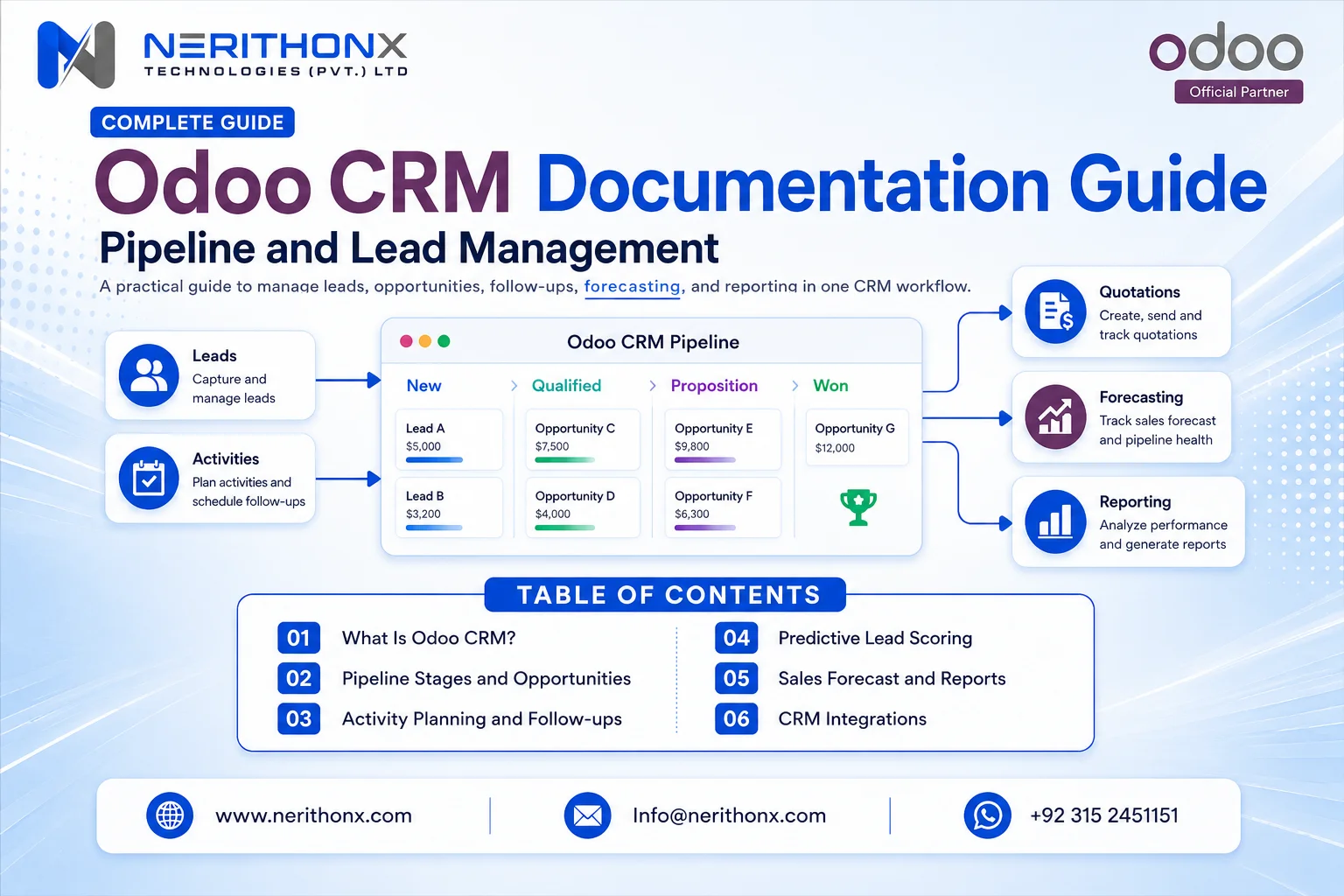
What Is Odoo CRM Documentation?
Odoo CRM documentation is the official task-based guidance for setting up and using Odoo’s customer relationship management app. It explains pipeline organization, lead acquisition, sales activities, assignment, quotations, reporting, and optimization. A practical implementation guide adds process design, data governance, role definitions, testing, and adoption advice around those official instructions.
The official documentation explains supported features and tasks. A practical guide shows how a company can combine them into a reliable sales process.
Confirm the documentation version. Odoo 19.0 is the baseline, while intermediary Odoo Online releases and other hosting models may differ.
Before configuration, define qualification, ownership, required data, and management measures. CRM should support a clear process.
Quick Odoo CRM Documentation Navigation Map
Business task | Relevant Odoo feature | Typical menu area | Official documentation topic | Main user or role |
Organize the pipeline | Stages and Kanban pipeline | CRM > Sales > My Pipeline | Organize the pipeline | Sales manager, salesperson |
Create leads | Manual entry and email aliases | CRM > Leads; CRM > Configuration > Sales Teams | Create leads from email or manually | Sales operations, salesperson |
Convert leads | Lead qualification and conversion | CRM > Leads | Salesperson | |
Manage activities | Calls, emails, meetings, plans | CRM > Configuration > Activity Types or Activity Plans | Salesperson, manager | |
Assign leads | Manual or rule-based assignment | CRM > Configuration > Settings and Sales Teams | Sales manager | |
Create quotations | Opportunity-to-quotation workflow | Open opportunity > New Quotation | Salesperson, sales administrator | |
Track lost opportunities | Lost status and lost reasons | Opportunity > Lost; CRM > Configuration > Lost Reasons | Salesperson, manager | |
Review unattended leads | Due and overdue activities | CRM > Reporting > Pipeline | Sales manager | |
Measure attribution | UTM source, medium, campaign | CRM > Reporting > Leads | Marketing and sales managers | |
Forecast sales | Expected close date and forecast | CRM > Reporting > Forecast | Sales manager, director | |
Enrich leads | Credit-based business data enrichment | CRM > Configuration > Settings | Sales operations |
Menu labels may vary. Confirm paths against the selected version and installed applications.

How Odoo CRM Works From Lead to Sale
A typical Odoo CRM workflow is:
- An enquiry enters through manual entry, email, a website form, an import, or an integration.
- A user reviews and qualifies it.
- If the Leads feature is enabled, the lead becomes an opportunity when it is ready for active selling.
- The record is assigned to a salesperson and sales team.
- The user schedules a call, email, meeting, or follow-up task.
- The opportunity moves through pipeline stages as verified actions occur.
- A quotation may be created through Odoo Sales.
- The opportunity is marked won or lost, with a useful lost reason where relevant.
- Managers review pipeline, activity, conversion, revenue, and forecast reports.
Exact behaviour depends on settings. Some companies skip a separate lead stage and create opportunities immediately. Other companies require qualification before sales ownership.
Hypothetical example: A manufacturer receives a website enquiry for a bulk order. Sales operations creates or reviews the lead, verifies product, quantity, location, and timing, then converts it into an opportunity. The salesperson schedules a discovery call, moves the deal only after qualification, prepares a quotation, and records the final outcome. This is an example, not a customer case study.
Decisions to Make Before Setting Up Odoo CRM
Confirm the Odoo major version and whether the database uses Community or Enterprise. Do not rely on a generic feature matrix; verify each critical requirement in the official edition comparison and a demonstration database.
Choose hosting deliberately. Odoo Online does not support non-standard custom modules; Odoo.sh supports Git-based development; on-premise deployment adds infrastructure responsibility and control.
Map the sales process first. Decide on leads, teams, access, meaningful stages, sources, and mandatory customer data.
Plan imports, cleanup, integrations, reports, training, and adoption. Managers also need rules for reviewing data quality and coaching users.
Step-by-Step Odoo CRM Setup
1. Install or Access the CRM App
Install or open CRM through the available Apps or subscription interface. Confirm the version, edition, access, company configuration, and required related apps.
2. Configure Sales Teams and Responsibilities
Create sales teams under the CRM configuration area. Give each team a clear purpose, such as direct sales, regional sales, channel sales, or a product line. Assign a team leader, members, ownership rules, and email alias where applicable.
Define receipt, reassignment, and cross-team visibility. Avoid shared queues without an accountable owner, and review sensitive access rights.
3. Decide Whether to Use Leads
A lead is useful when enquiries require screening before they become active deals. This can help high-volume teams separate incomplete, irrelevant, duplicated, or low-fit enquiries from opportunities that deserve sales time.
A business may work directly with opportunities when every enquiry should enter the pipeline immediately. The official lead-conversion guide explains how the optional Leads setting adds a qualification step.
4. Design Pipeline Stages
A practical starting pipeline is:
Stage | Meaning | Suggested exit condition |
New | Enquiry received | Owner assigned and first review completed |
Contacted | First outreach attempted or completed | Customer need and contact status recorded |
Qualified | Need, fit, timing, and buying process understood | Deal is worth active pursuit |
Proposal or Quotation | Commercial proposal prepared | Proposal sent and follow-up scheduled |
Negotiation | Terms, scope, or approval under discussion | Final decision pending |
Won | Customer accepted | Required sales confirmation completed |
Lost | Deal will not proceed | Lost reason and closing note recorded |
Stages should represent business actions and decision points, not decorative columns. Define when a user may move a deal and which fields or activities should be complete.
5. Configure Tags, Sources, Lost Reasons, and Required Data
Use tags for controlled segmentation, such as product interest, industry, deal type, or priority. Use source, medium, and campaign fields consistently when marketing attribution matters.
Create a short, governed lost-reason list such as budget, timing, no decision, competitor, unsuitable requirement, or unreachable. Keep reasons specific enough for analysis but stable enough for consistent reporting. Add required fields only when the data is genuinely needed and users can collect it.
6. Capture Leads
Odoo can create leads or opportunities manually, through sales-team email aliases, Odoo Website contact forms, imports, and integrations. Review the official Odoo 19 lead-creation guidance before configuring aliases or imports.
External forms and applications need agreed field mapping, duplicate handling, consent rules, error monitoring, and ownership. Lead mining and lead enrichment are separate services and may require configuration and Odoo in-app purchase credits. Validate their suitability and privacy implications before enabling them.
7. Configure Activities and Activity Plans
Activities turn pipeline records into scheduled work. Configure practical types for calls, emails, meetings, tasks, and other follow-ups. Use due dates, summaries, responsible users, templates, and next-activity rules carefully.
Activity plans can schedule a repeatable sequence for a defined process, such as a new inbound enquiry or high-value opportunity. The official activities guide explains custom activity types, chaining, tracking, and plans.
Mark completed work as done and schedule the next action. A visually tidy pipeline is not reliable when activities and opportunity data are outdated.
8. Configure Lead Assignment and Predictive Lead Scoring
Start with clear manual ownership. Add rule-based assignment only after team responsibilities and matching conditions are understood. Rules may use domains to route records to teams or individuals, and automatic assignment can run on a configured schedule.
Odoo’s predictive lead-scoring documentation explains that historical won and lost data influences calculated probability. The model can consider configured variables, while stage and team remain part of the calculation.
Clean, representative history matters. A probability is a decision-support signal, not a guaranteed prediction. Review it alongside deal quality, customer evidence, next actions, and salesperson judgement.
General manufacturing ERP supports production, inventory, purchasing, sales, and accounting.
Pharma manufacturing software needs stronger focus on:
- Batch control
- Formula accuracy
- Quality documentation
- Expiry tracking
- Lot traceability
- Recall readiness
- Controlled records
- User access control
- Documentation workflows
A flexible ERP like Odoo can be configured and customized for pharma workflows, but pharma-specific needs must be carefully mapped before implementation.

Managing Daily Sales Work in Odoo CRM
Start each day with due and overdue activities. Review priority opportunities, record material updates, and keep revenue and closing dates current.
Schedule the next action before leaving a record. Move an opportunity only when the stage condition is met. Mark won and lost outcomes accurately, and select a useful lost reason rather than leaving failed deals indefinitely active.
Each week, managers should review unattended work, ageing, conversion, win and loss reasons, pipeline ownership, close dates, and forecast quality.
The unattended leads report depends on regular activity use. Reports cannot identify neglected work reliably when the underlying activity discipline is weak.

Creating Quotations From CRM Opportunities
Odoo CRM can connect an opportunity with a quotation when the Sales app is installed and the user has the required access. A salesperson opens the opportunity, confirms customer details, creates a quotation, adds products or services, and follows the configured commercial process.
Products, price lists, taxes, validity dates, discounts, approvals, templates, customer data, and access rights can change the exact flow. Follow the Odoo CRM quotation instructions for the selected version.
This creates a connected enquiry-to-sale workflow. It does not remove the need to configure Odoo Sales properly. Companies implementing a broader process should include quotation design in their Odoo ERP implementation scope.
Odoo CRM Reports and KPIs
Odoo 19 documentation covers pipeline analysis, expected revenue, forecast, unattended leads, quality leads, lead distribution, marketing attribution, and won-versus-lost analysis. Available measures and views may change with installed apps and permissions.
Managers can use pipeline analysis to group opportunities by stage, team, salesperson, source, or outcome. Expected revenue depends on active opportunities and closing dates. The forecast report organizes upcoming opportunities by expected close period, while marketing attribution can use UTM medium, source, and campaign data.
Useful KPIs include:
- New leads and lead response time
- Lead-to-opportunity conversion
- Opportunity win rate and average deal value
- Pipeline value and expected revenue
- Sales-cycle length
- Opportunities with no next activity
- Opportunities past their expected closing date
- Lost reasons
- Performance by source, team, and salesperson
Do not invent universal benchmarks. A KPI is only reliable when definitions are stable and users maintain accurate dates, values, ownership, sources, activities, and outcomes.

Integrating Odoo CRM With Other Business Apps
Native Odoo app connections can link CRM with Sales, Website, Email Marketing, Marketing Automation where available, Calendar, Invoicing or Accounting, Inventory, Helpdesk, and Projects. Installed apps and configuration determine the actual workflow.
External websites, telephony, WhatsApp or other messaging solutions, eCommerce, logistics, payment services, and proprietary applications may need a third-party connector, API integration, or custom development. Do not assume every connection is automatic.
For each integration, define the system of record, field mapping, synchronization, duplicate rules, security, error handling, testing, and ownership. Review Odoo integration services when the requirement extends beyond standard app configuration.

Data Quality, Permissions, and CRM Governance
Prevent duplicate companies, contacts, leads, and opportunities through import checks, matching rules, user training, and periodic review. Use consistent naming, controlled tags and sources, and an accountable owner for every active deal.
Apply role-based access according to business need. Test who can view, create, edit, export, reassign, mark lost, and access reports. Sensitive changes may require technical security rules rather than interface-level assumptions.
Define how records are archived, restored, or marked lost. Validate imports in a test database, keep activities current, and hold regular pipeline reviews. Create retention and deletion policies with qualified legal and privacy advisers for each applicable country; this article does not provide legal advice.
Common Odoo CRM Mistakes and How to Avoid Them
Approach | Typical examples | Use when | Main caution |
Standard configuration | Rename stages, create teams, add tags, configure activities, set access, use available reports | The requirement fits supported settings | Avoid unnecessary complexity |
Customization | New fields, approvals, dashboards, industry automation, interface changes, new modules | A documented requirement is not met by standard tools | Assess upgrades, testing, security, and maintenance |
Integration | Websites, telephony, external CRM or ERP data, payment, logistics, eCommerce, marketing, proprietary apps | Data or processes must cross system boundaries | Define mapping, errors, ownership, and monitoring |
Use standard functionality first. Customize only where there is a clear business requirement and measurable benefit. Configuration is usually simpler to maintain; customization changes Odoo behaviour; integration connects Odoo with another system.
For scoped changes, review Odoo CRM customization and confirm that the proposed solution cannot be handled safely through configuration.
Odoo CRM Use Cases for Different Businesses
Startups: Track founder-led sales with a simple pipeline, next activities, expected value, and source data.
Professional services: Qualify enquiries, schedule discovery, prepare proposals, and connect won work with Projects or invoicing.
Retailers: Manage wholesale, corporate, franchise, or high-value enquiries that do not belong in a normal point-of-sale queue.
Distributors: Track product, territory, channel, quantity, quotation, and follow-up before confirmation.
Manufacturers: Qualify technical requirements, volume, timing, and feasibility before quotation.
International sales teams: Route leads by region, language, product, or team, while maintaining shared definitions for sources, stages, revenue, and outcomes.
These hypothetical patterns must be adapted to the actual process.
Using Odoo CRM Across Global Teams and Markets
Create separate sales teams where regional ownership or management genuinely differs. Configure time zones, user languages, company and currency settings, and local working calendars carefully.
Regional assignment rules can help teams in Pakistan, the UAE, Saudi Arabia, the UK, the US, Canada, Europe, and other markets, but global reports need consistent stage definitions, source naming, and KPI formulas. Local processes should vary only where commercial or regulatory requirements justify the difference.
Review country-specific privacy, retention, messaging, and customer-consent requirements with qualified advisers. Validate local telephony, messaging, accounting, and website integrations rather than assuming one connector works in every market.

Odoo CRM Implementation Checklist
Before configuration
- Confirm version, edition, hosting, subscriptions, and installed apps
- Map the lead-to-sale process and qualification rules
- Define teams, roles, access, stages, sources, required fields, and KPIs
- Clean and deduplicate data
- Identify integrations and reporting requirements
During configuration
- Create teams, members, ownership rules, and aliases
- Decide whether to enable Leads
- Configure stages, activities, plans, tags, sources, and lost reasons
- Configure assignment and scoring only after data and rules are understood
- Build imports, integrations, permissions, and reports in a test environment
Before launch
- Test realistic lead, opportunity, quotation, won, lost, and reporting scenarios
- Validate imports and integration failures
- Confirm access by role
- Train users with their daily and weekly routines
- Prepare go-live support and issue ownership
After launch
- Review data quality, adoption, unattended records, and forecast accuracy
- Correct stages, fields, reports, or training where evidence shows a problem
- Maintain Odoo support and maintenance ownership
- Plan continuous improvement without uncontrolled customization
Conclusion
The official Odoo manual should remain the source of truth for version-specific instructions. This Odoo CRM documentation companion helps businesses turn those instructions into a practical setup, daily routine, reporting model, and governance process.
Successful CRM use depends on process design, careful configuration, clean data, training, realistic permissions, and regular management review. Evaluate standard Odoo functionality before approving customization, and test integrations, migrations, automation, and reports against real requirements.
Need help configuring Odoo CRM around your real sales process? NerithonX Technologies provides Odoo implementation, customization, integration, migration, training, and ongoing support for businesses worldwide.
FAQ
Frequently Asked Questions
What is Odoo CRM documentation?
Odoo CRM documentation is the official user guidance for configuring and using Odoo’s customer relationship management app. It covers pipeline organization, lead acquisition, activities, assignment, quotations, reporting, and related features. A practical implementation guide adds business-process advice, governance, examples, and setup sequencing around that official reference.
Where can I find the official Odoo CRM documentation?
You can find it in the Odoo 19 documentation under Sales > CRM at https://www.odoo.com/documentation/19.0/applications/sales/crm.html. Check the version selector before following a menu path because screens and features can differ between major versions, Odoo Online intermediary releases, editions, installed apps, permissions, and database configuration.
Is Odoo a CRM or an ERP system?
Odoo is a modular business application suite that includes CRM and broader enterprise resource planning functions. A company can use CRM by itself or connect it with Sales, Invoicing, Accounting, Inventory, Website, Projects, Helpdesk, and other apps. The available flow depends on the edition, subscription, installed modules, and configuration.
What is the difference between leads and opportunities in Odoo CRM?
A lead is an unqualified enquiry that may need review before sales invests time in it. An opportunity is an active potential deal being managed in the pipeline. Odoo can enable leads as a separate qualification step, or a business can work directly with opportunities when every enquiry is ready for immediate sales follow-up.
How do I set up a sales pipeline in Odoo CRM?
Start by mapping the real sales process, then create a small number of stages that represent meaningful actions or decisions. Define entry and exit conditions, ownership, required data, activities, lost reasons, and reporting rules. Test the pipeline with realistic scenarios before launch, and avoid adding columns that do not change how the team works.
Can Odoo CRM automatically score and assign leads?
Odoo 19 CRM includes predictive lead scoring and rule-based assignment in the official documentation. Predictive scoring uses historical CRM outcomes to estimate probability, while assignment rules can route matching records to teams or salespeople. Treat probability as decision support, not certainty, and verify configuration, permissions, data volume, and edition-specific availability in your database.
Which reports are available in Odoo CRM?
Odoo 19 documentation covers pipeline analysis, expected revenue, forecast, unattended leads, quality leads, lead distribution, marketing attribution, and won-versus-lost analysis. The exact menus, measures, and views can vary with installed apps and access rights. Managers should define KPIs first and verify that users maintain the underlying fields consistently.
Can Odoo CRM create quotations?
Yes, CRM opportunities can create quotations when the Odoo Sales app and the required permissions are available. The quotation then follows Sales configuration for products, price lists, taxes, validity, approvals, and customer details. This connects an enquiry with the commercial sales process without turning CRM into a separate, disconnected customer database.
Can Odoo CRM integrate with websites and other business software?
Yes, Odoo CRM can receive opportunities from Odoo Website forms and connect with other Odoo apps. External websites, telephony, messaging, eCommerce, logistics, and proprietary systems may require configuration, a third-party connector, API work, or custom development. Each integration should define ownership, field mapping, error handling, security, and support responsibilities.
Is Odoo CRM suitable for SMEs?
Odoo CRM can suit small and medium-sized enterprises when its pipeline, roles, data fields, and reports match the sales process. SMEs can begin with standard features and add connected apps as needs grow. Suitability should be assessed against required functionality, implementation effort, user adoption, reporting, integrations, hosting, and the chosen edition.
Are all Odoo CRM features available in Community and Enterprise?
No universal feature assumption should be made. Odoo provides Community and Enterprise editions, and functionality can also depend on the version, hosting model, installed applications, subscription, country configuration, access rights, and in-app purchase credits. Verify important requirements in the official edition comparison and a test database before committing to a design.
When should a business customize Odoo CRM?
Customize Odoo CRM only when a verified business requirement cannot be met safely through standard configuration or an appropriate existing app. Good reasons may include essential fields, approvals, industry workflows, dashboards, or integrations. Document the benefit, upgrade impact, security needs, testing effort, ownership, and maintenance cost before approving custom development.